
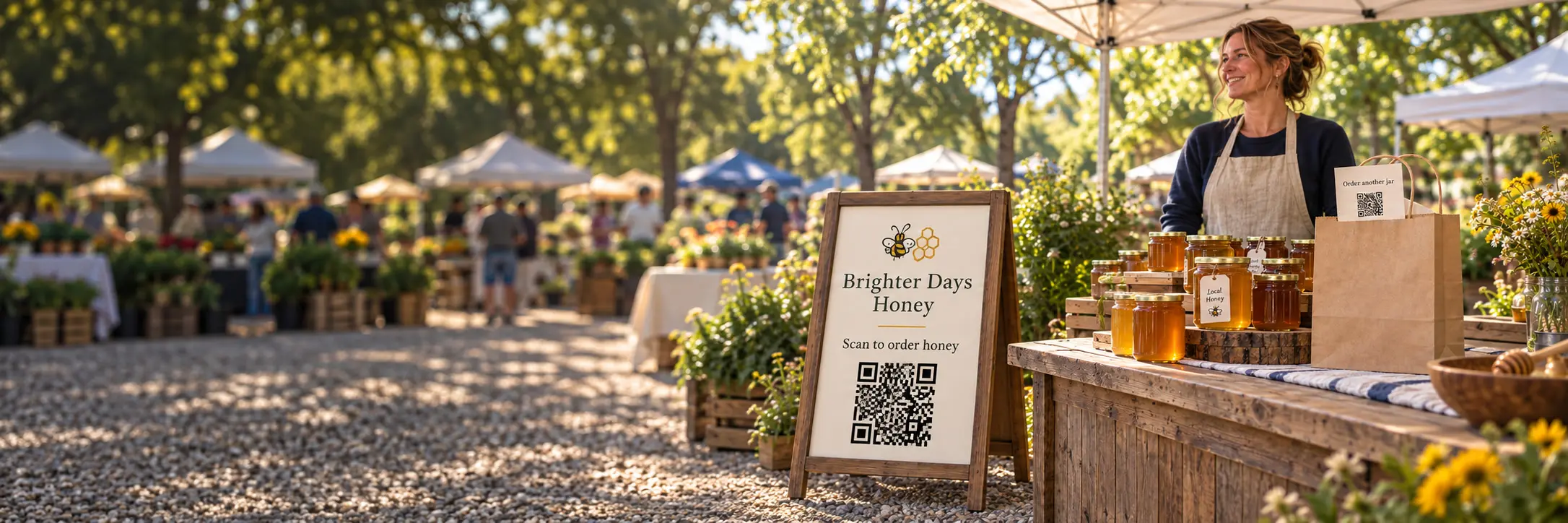
The sign stays at the market. Put the reorder link in the bag.
ON THIS PAGE
- What is a useful QR code setup for a farmers-market vendor?
- What should the QR code open?
- Where should you put the stall sign?
- What belongs on the card that goes home?
- Can you tell whether the cards get used?
- What changes when the season changes?
- What should you prepare before the next market?
- Common questions
The stall sign helps customers at the market, but it does not go home with the person who wants to buy again next week.
What is a useful QR code setup for a farmers-market vendor?
A stall sign for the customer standing in front of you, and a take-home card for the customer who wants to buy again. Point each at the action it promises: reserve a produce box, order another jar, or find next week’s market. A Graklink dynamic QR code includes destination editing and basic scan counts.
The difference between the two placements matters. Your sign is useful while the stall is open. When the honey runs out on Wednesday, your card gives them an easy way to order the jar they already know they like. They don’t have to remember your stall’s name or wait until Saturday to find you again.
What should the QR code open?
The order form, product page or schedule itself. A sign that says “Reserve next week’s box” should open the reservation page, with the pickup details already there. Sending that customer to your homepage gives them another job before they can give you an order.
| Where you put it | What the customer needs | What to write beside it |
|---|---|---|
| Stall sign | Next week’s preorder form | Reserve next week’s box |
| Card in the bag | Reorder page | Order another jar |
| Product label | Instructions for that product | How to cook these beans |
| Business card | Current market schedule | Find our next market |
Choose the destinations you can keep useful. If you only sell in person, a current schedule is better than an unfinished online shop. If you take preorders, show the cutoff and pickup location on the form. Graklink sends the visitor there; your form or shop takes the order and payment.
You do not need to build a website to do this. An existing public form or shop page works. Open it while signed out before you print, so you see what a customer sees.
Where should you put the stall sign?
Beside the product or at the place people wait, where they can stop and use their phones without holding up payment. Avoid laying it flat behind the jars. A customer should not have to lean across the table to discover what the QR code is for.
Give the instruction as much attention as the QR code. “Scan me” tells someone how to use a camera. “Reserve next week’s box” tells them why to bother. Keep the promise specific enough that the page can fulfill it. The QR code caption guide has more examples.
Print a sample before ordering the finished signs. Set it up under your canopy, in its holder, and scan it from the customer’s side. A glossy cover can catch glare. A dark pattern needs a light background and clear space around it. Your final test is the printed sign in that spot, not the image on a laptop. Use the print-size guide to choose dimensions for the viewing distance.
What belongs on the card that goes home?
Your business name, a useful next action and the QR code. Keep a readable web address or contact option too. Someone who cannot load the page at the market should still be able to find you later.
A reorder card can stay useful across several purchases. A recipe QR code on a product label does a different job: it helps someone use what they bought. If you sell something unfamiliar, such as a variety of bean that needs different preparation, instructions may be more useful than another sales message.
Keep the cooking instructions available for as long as customers may have those beans in the cupboard. If the recipe moves to a new page, update the destination so the label still opens the instructions.
Can you tell whether the cards get used?
Yes, if the cards have their own QR code. Give the stall sign and the card separate QR codes and name them by placement in the dashboard. They can open the same order page while keeping separate scan counts. If you print the same QR code on both, you get one combined count.
The free counters show activity on each. For example, activity on the card after market day tells you the card is still being used after the stall has closed. That is useful when deciding whether to print another batch.
Check completed purchases in your ordering service. A higher count on the stall sign may reflect how many people saw it. Note how many cards you handed out and how long each sign was displayed. Compare similar periods before changing the design, then use the ordering service to check purchases. Our placement comparison guide walks through that distinction.
What changes when the season changes?
If you update the stock or dates on the same page, nothing changes in Graklink. Leave the QR code alone.
If you make a new order form with a new address, update the destination in your dashboard. The QR code on the sign and every copy already handed out then opens that form. Destination edits are included in the purchase.
When preorders close, leave customers an answer. The destination can explain the next opening date or show where to buy in person. A working page that says when to return is more useful than a closed form with no explanation.
What should you prepare before the next market?
Choose the action you want someone to take and test that page on your phone. Print a sample with the instruction beside it, and check it on the actual stall.
For repeat orders, put a copy in the bag. The customer already found you once. Give them the address they will need when they want more.

Common questions
How should farmers-market vendors use QR codes?
Put a QR code where the next action belongs: a preorder link on a stall sign, a reorder link on a take-home card, or a market schedule on your packaging. Write the action beside it and open the exact page that completes it.
Do I need my own website?
No. You can link to an existing public order form, shop page or schedule. Test it while signed out so you know customers can open it without access to your account. Your ordering service handles orders and payments.
Should the sign and packaging use different QR codes?
Use different QR codes if you want separate scan counts. The same QR code on both surfaces gives you one combined count. Either setup can send customers to the same destination.
Can I keep the QR code when next season's order form changes?
Yes. Update a Graklink dynamic QR code's destination in the dashboard and every printed copy opens the new address. If you only change the contents of the existing page, leave the QR code alone.
Can a QR code tell me how many customers ordered?
A scan count does not establish completed orders or identify individual customers. Use scan activity to understand which printed materials get used, then check purchases in your ordering service.
Sources and verification dates
Source links, check dates and available archived copies are listed below.
- DENSO WAVE: QR code margins
Checked September 15, 2026.
A clear margin four modules wide is required on each side.
Live page; no archived copy supplied.
- Graklink terms
Checked September 15, 2026.
Purchased products, subscription cancellation, trial conditions and service continuity.
Graklink’s published product information.
Make your QR code in a minute
$7.99 once. Unlimited scans. 30-day money-back guarantee.